💻 Tiwut System Cleaner
Optimize Your PC's Performance
Tired of a sluggish system? Tiwut System Cleaner is a powerful, yet easy-to-use, Python-based utility designed to safely remove common junk files, free up disk space, and enhance your PC's speed. Built with the tkinter GUI for a simple, native Windows experience.
✨ Key Features
- Comprehensive Cleanup: Target a wide range of unnecessary files, including temporary files, logs, and browser caches.
- Safe Operation: Designed to clear only non-essential files and folders, reducing the risk of data loss.
- Admin Privileges: Automatically requests administrator rights to ensure a deep and thorough system sweep for protected areas like System Temp and Prefetch.
- Detailed Logging: Provides a real-time activity log during the cleaning process, so you know exactly what is being removed.
- One-Click Actions: Easily Select All or Deselect All options with dedicated buttons.
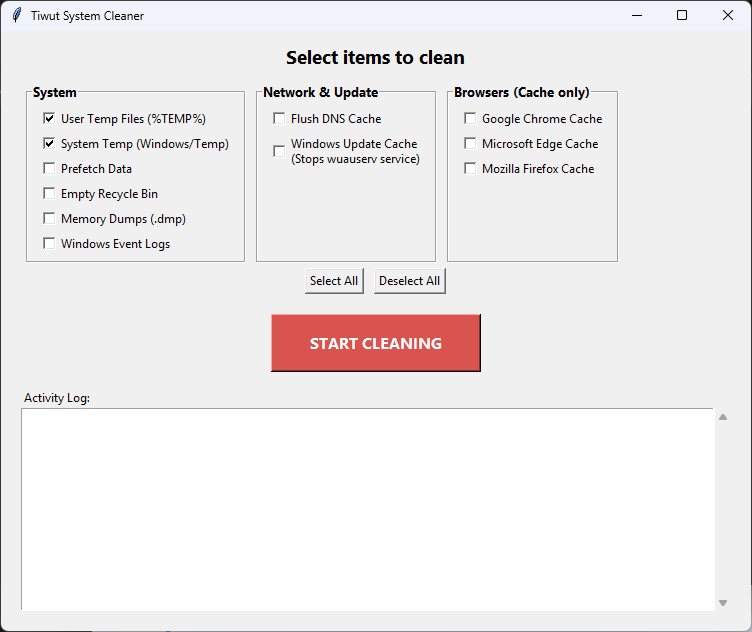
🧹 What Can Tiwut Clean?
The application offers granular control over the cleanup process. You can choose any combination of the following items:
System Cleanup
- User Temp Files: Removes files from the user's `%TEMP%` directory.
- System Temp (Windows/Temp): Clears temporary files from the system's `%WINDIR%\Temp` folder.
- Prefetch Data: Clears optimization files (Note: May slightly increase boot time temporarily).
- Empty Recycle Bin: Permanently deletes files in the Recycle Bin.
- Memory Dumps (`.dmp`): Removes system crash and error reports (Minidumps).
- Windows Event Logs: Clears accumulated system event log files.
Network & Update
- Flush DNS Cache: Runs `ipconfig /flushdns` to clear old DNS entries.
- Windows Update Cache: Clears downloaded update files by temporarily stopping and restarting the `wuauserv` service.
Browser Cache
- Google Chrome Cache: Clears temporary files for the default profile.
- Microsoft Edge Cache: Clears temporary files for the default profile.
- Mozilla Firefox Cache: Detects and clears the cache for all local profiles.
⬇️ How to Use It
- Download: Save the
main.pyfile to your computer. - Run: Execute the script using Python (e.g., double-click or run
python main.py). - Admin Prompt: The application will automatically prompt you to run as an administrator, which is required for full functionality.
- Select & Clean: Choose the items you wish to clean and click the START CLEANING button.
- Review: Monitor the Activity Log for details on the files removed and space freed.
Note: Because this script performs deep system cleaning tasks, running it as a Windows Administrator is mandatory. The application handles this automatically upon launch.